Wallet
Communication Methods.
- BetMakers to Wallet API - OAuth Client Credentials.
- Wallet to BetMakers API - OAuth Client Credentials.
- Widget to BetMakers API - JWT.
BetMakers to Wallet Integration
Your existing wallet implementation can be used to authorise funds for wagering and receive payout information (via a simple REST API).
There are a couple of API's your team will need to provide to ensure that bets can be taken and managed successfully.
Note Processing bet lists (multiple bets) can be done by a single request via the widget component. However each bet on the list will be looped through and pushed to Wallet Integration as single bet. (Meaning that it will follow the same flow for both bet lists and single bets) This sequential style processing is to facilitate the bet limit validations.
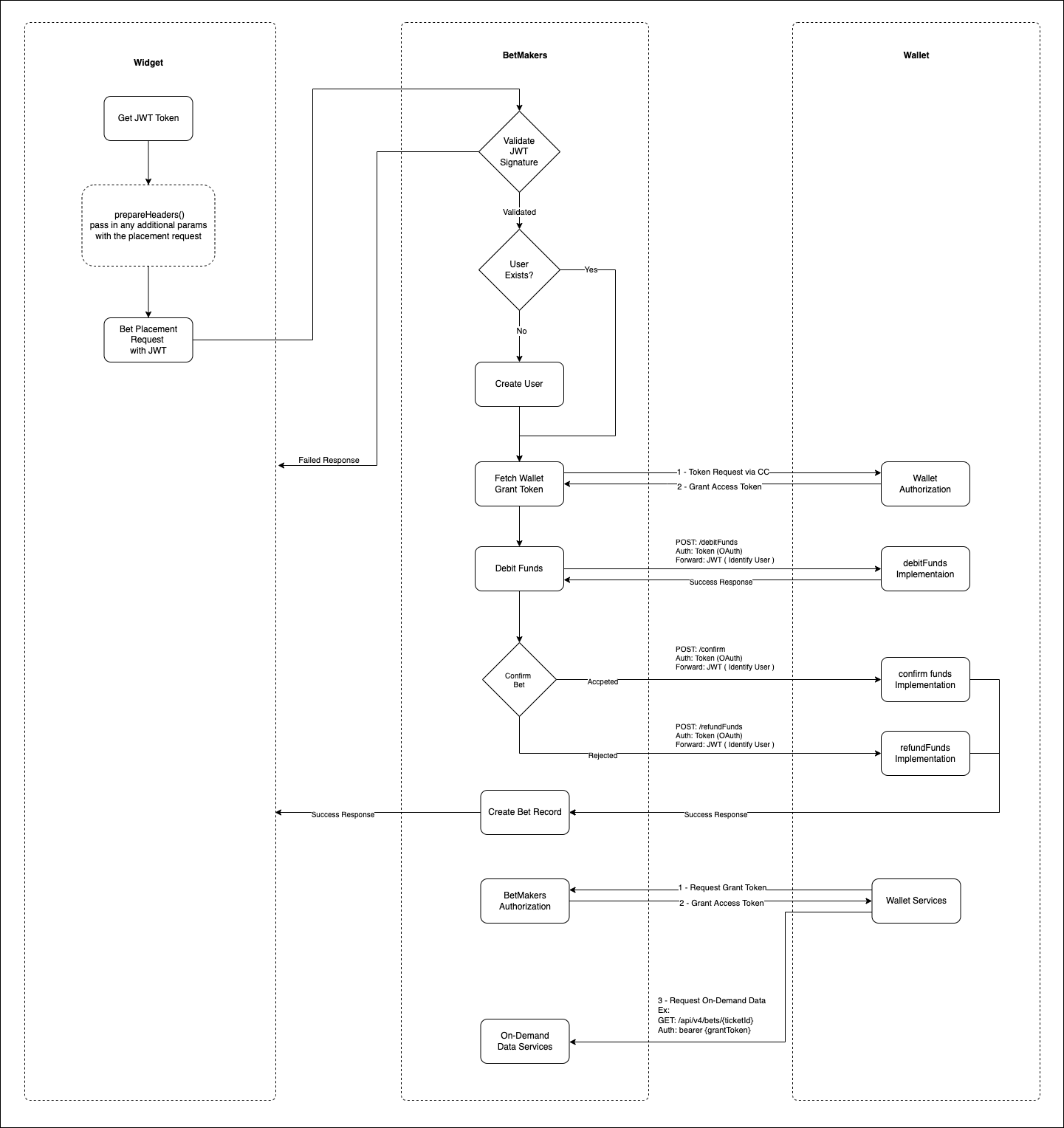
Wallet Authorization.
You"ll need to implment OAuth Client Credentials grant type.
We'll call the token endpoint to with client_id and client_secret to fetch the token.
That token will be used as bearer token to authorize calls to Wallet.
POST {WalletIntegrationEndpoint}/v1/token

Request body:
{
    "grant_type": "client_credentials",
    "client_id": "TestClient",
    "client_secret": "TestSecret;
}

Response:
{
    "access_token": "03807cb390319329bdf6c777d4dfae9c0d3b3c35",
    "expires_in": 3600,
    "token_type": "bearer",
    "scope": null
}
Cash Transactions
These transactions should be processed via the customers main account. All transactions are based on real money as should be treated as such.
Debit Funds
Before selling the bet we'll call your endpoint to request funds:
POST {WalletIntegrationEndpoint}/v1/debitFunds

Request body:
{
    "bonus_flag": false,
    "jwtToken": "TOKEN_GENERATED",
    "userId": "WALLET_USER_ID",
    "amount": 1000,
    "betData": {
        "ticketId": "123123-1e323-fds23-ar332-3424234",
        "betId": "1-234-5678",
    }
}

Success Response:
{
    "amount": 1000,
    "walletTransactionId": "1234-5678"
}

Error Response:
{
    "message": "Readable message.",
    "code": "ErrCode",
    "statusCode": 401
}
Confirm
Once we've verified we have the necessary funds we'll attempt to sell the bet. If the bet is successfully sold in the betting system we'll confirm the transaction has been completed:
POST {WalletIntegrationEndpoint}/v1/confirm

Request body:
{
    "bonus_flag": false,
    "userId": "WALLET_USER_ID",
    "walletTransactionId": "12312-213-123aa",
    "ticketId": "123123-1e323-fds23-ar332-3424234",
    "betId": "1-234-5678",
    "amount": 600, // Accepted amount.
    "rejected": 400 // Amount partially refunded by the trader.
}

Success Response:
{
    "amount": 600,
    "walletTransactionId": "1234-5678", // Can be null if there are no partial refunds.
}

Error Response:
{
    "message": "Readable message.",
    "code": "ErrCode",
    "statusCode": 401
}
Refund Funds
If there's a problem selling the bet, we'll call let you know to refund the transaction:
POST {WalletIntegrationEndpoint}/v1/refundFunds

Request body:
{
    "bonus_flag": false,
    "userId": "WALLET_USER_ID",
    "walletTransactionId": "12312-213-123aa",
    "ticketId": "123123-1e323-fds23-ar332-3424234",
    "betId": "1-234-5678",
    "reasonCode": "BettingOff",
    "reasonString": "Betting is closed",
    "refunds": 100, // Refunded amount.
    "cancelled_winnings": 255, // Cancelled winning amount.
}

Success Response:
{
    "amount": 600,
    "walletTransactionId": "1234-5678",
}

Error Response:
{
    "message": "Readable message.",
    "code": "ErrCode",
    "statusCode": 401
}
Payout
When the race is official and we know how much the ticket paid, we'll call to let you know the ticket liability:
POST {WalletIntegrationEndpoint}/v1/settle

Request body:
{
    "bonus_flag": false,
    "userId": "WALLET_USER_ID",
    "ticketId": "123123-1e323-fds23-ar332-3424234",
    "betId": "1-234-5678",
    "winnings": 2590,
    "refunds": 100 // Any partial refunds due to scratches.
}

Success Response:
{
    "amount": 154000,
    "walletTransactionId": "1234-5678-123"
}

Error Response:
{
    "message": "Readable message.",
    "code": "ErrCode",
    "statusCode": 401
}
Bonus Transactions
Following transactions should be processed on customer's bonus account. Apart from payout and cancelled winning all the other transactions are tokens issued by the bookmaker (Not realy money)
**If required we have the ability to post all the requests to different endpoint. Which is identified as OptionalPrefix in the documentation.
Debit Funds
Before selling the bet we'll call your endpoint to request funds:
POST {WalletIntegrationEndpoint}/{OptionalPreix}/v1/debitFunds

Request body:
{
    "bonus_flag": true,
    "jwtToken": "TOKEN_GENERATED",
    "userId": "WALLET_USER_ID",
    "amount": 1000,
    "betData": {
        "ticketId": "123123-1e323-fds23-ar332-3424234",
        "betId": "1-234-5678",
    }
}

Success Response:
{
    "amount": 1000,
    "walletTransactionId": "1234-5678"
}

Error Response:
{
    "message": "Readable message.",
    "code": "ErrCode",
    "statusCode": 401
}
Confirm
Once we've verified we have the necessary funds we'll attempt to sell the bet. If the bet is successfully sold in the betting system we'll confirm the transaction has been completed:
POST {WalletIntegrationEndpoint}/{OptionalPreix}/v1/confirm

Request body:
{
    "bonus_flag": true,
    "userId": "WALLET_USER_ID",
    "walletTransactionId": "12312-213-123aa",
    "ticketId": "123123-1e323-fds23-ar332-3424234",
    "betId": "1-234-5678",
    "amount": 600, // Accepted amount.
    "rejected": 400 // Amount partially refunded by the trader.
}

Success Response:
{
    "amount": 600,
    "walletTransactionId": "1234-5678", // Can be null if there are no partial refunds.
}

Error Response:
{
    "message": "Readable message.",
    "code": "ErrCode",
    "statusCode": 401
}
Refund Funds
If there's a problem selling the bet, we'll call let you know to refund the transaction:
POST {WalletIntegrationEndpoint}/{OptionalPreix}/v1/refundFunds

Request body:
{
    "bonus_flag": true,
    "userId": "WALLET_USER_ID",
    "walletTransactionId": "12312-213-123aa",
    "ticketId": "123123-1e323-fds23-ar332-3424234",
    "betId": "1-234-5678",
    "reasonCode": "BettingOff",
    "reasonString": "Betting is closed",
    "refunds": 100, // Refunded amount.
    "cancelled_winnings": 255, // Cancelled winning amount. ( Real Money )
}

Success Response:
{
    "amount": 600,
    "walletTransactionId": "1234-5678",
}

Error Response:
{
    "message": "Readable message.",
    "code": "ErrCode",
    "statusCode": 401
}
Payout
When the race is official and we know how much the ticket paid, we'll call to let you know the ticket liability:
POST {WalletIntegrationEndpoint}/{OptionalPreix}/v1/settle

Request body:
{
    "bonus_flag": true,
    "userId": "WALLET_USER_ID",
    "ticketId": "123123-1e323-fds23-ar332-3424234",
    "betId": "1-234-5678",
    "winnings": 2590, // This is real money.
    "refunds": 100 // Any partial refunds due to scratches.
}

Success Response:
{
    "amount": 154000,
    "walletTransactionId": "1234-5678-123"
}

Error Response:
{
    "message": "Readable message.",
    "code": "ErrCode",
    "statusCode": 401
}
Wallet to BetMakers Integration (On demand services)
You'll also have access to BetMakers to fetch on demand data.
Access can be gained via OAuth Client Credential token.
Betmakers Authorization.
You'll need to pass the client_id and client_secret to token endpoint.
Upon which you'll receive an token which will be used as bearer token to authorize calls to Betmakers.
POST {BetMakersEndpoint}/api/v4/auth/token

Request body:
{
    "grant_type": "client_credentials",
    "client_id": "TestClient",
    "client_secret": "TestSecret;
}

Response:
{
    "access_token": "03807cb390319329bdf6c777d4dfae9c0d3b3c35",
    "expires_in": 3600,
    "token_type": "bearer",
    "scope": null
}
Bet Data Structure.
Notes
Possible Payout Calculations.
- Can be calculated via:
amount x odds- Certain bet type do not have the odds at the bet placement. (can be null value)
User identity.
userIdrefers to unique id that passed to BetMakers by the Wallet Service.Leg numbers and position of the runners.
- In a multi selection bet type you can use the
selection->positionfield to determine the leg number.- For single legged bets this is used to determine the position. (P1, P2, P3)
- For multi legged bets this is used to determine the leg number (Ex: dailydouble:
position: 1=> First event)
Example Response
{
    "amount": 10000,
    // Indicates the bonus bet or not.
    "bonus_flag": false,
    "transactions": {
        // Intially debited amount from wallet.
        "debits": 100,
        // Bet payout amount.
        "winnings": 225,
        // Cancelled payout amount.
        "cancelled_winnings": 225,
        // Fully refunded or partially refunded amount.
        "refunds": 100,
        // Fully or partially rejected amount.
        "rejects": 0,

        // Following transactions are related to bonus credit.
        // Intially debited amount from wallet.
        "bonus_debits": 100,
        // Fully refunded or partially refunded amount.
        "bonus_refunds": 100,
        // Fully or partially rejected amount.
        "bonus_rejects": 0,
    },
    // Can be a nullable value for certain bet types
    "odds": 1.5,
    "ticketId": "123123-1e323-fds23-ar332-3424234",
    "betId": "123e4567-e89b-12d3-a456-426614174000",
    // (cancelled | failed | fully-refunded | paid | partially-refunded | pending | processing | rejected | unresulted | unsettled)
    "status": "unresulted",
    // (dailydouble | derivative | duet | eachway | exacta | firstfour | margin | multi | place | quaddie | quinella | sport | srm | straighteight | trifecta | us_place | win)
    "type": "win",
    // (bestorsp | BET | BM | BOB | boost | brand key | BTP | GT | JPNTOT | legacy | midtote | NSW | OSP | PA | SIS | SL tote | SP | SRM | supertab | supertab-old | TATTS | TBF | Test | TF | toptote | unitab | USTOTE)
    "product": "TBF",
    // Bet selection details array.
    "selections": [
        {
            "position": 1,
            "event_name": "Free Entry Tabtouch Park",
            "name": "Gotta Fly",
            "no": 1,
            "bet_type": "win",
            "product": "TBF"
        },
        {
            "position": 2,
            "event_name": "Free Entry Tabtouch Park",
            "name": "Gotta Fly",
            "no": 1,
            "bet_type": "win",
            "product": "TBF"
        }
    ]
}
Getting Data for Single Bet.
To get live status of the bet and other information.
GET {BetMakersEndpoint}/api/v4/external/bets/{betId:UUID}

Authorization: Bearer {grantToken}
Response:
{
    "data": BET_OBJECT
}
Getting bets for transaction id.
GET {BetMakersEndpoint}/api/v4/external/bets/byTxId/{ticketId}

Authorization: Bearer {grantToken}
Response:
{
    "data": [
        BET_OBJECT,
        BET_OBJECT,
        BET_OBJECT,
    ],
}
Getting User Bets.
Gets the bets for the user.
GET {BetMakersEndpoint}/api/v4/external/users/{userId}/bets?page=1&betType={win}&product={product}&orderBy={latest|oldest}

Authorization: Bearer {grantToken}
Response:
{
    "data": {
        "current_page": 1,
        "last_page": 3,
        "per_page": "15",
        "total": 34,
        "data": [
            BET_OBJECT,
            BET_OBJECT,
            BET_OBJECT
        ],
    },
}
Cancelation
In case you need to cancel a wager, we host an API you can call:
POST {BetMakersEndpoint}/api/v4/external/bets/cancel

Request body:
{
    "betId": "123-435-45",
    "reasonCode": "PaymentError",
    "reasonString": "Unable to process the payment."
}
Widget to BetMakers Integration.
Authorization.
We use JWT/JWKS standard to communate between two platforms securely.
- These keys are generated using RSA private and public keys.
- In order to get authorized and validated you'll need to prepare JWKS endpoint using
RS256method. Example payload:
{
    "keys": [
        {
            "kty": "RSA",
            "use": "sig",
            "alg": "RS256",
            "kid": "64527lkxjcvnkawk11213a",
            "n": "0oDGt_owqzVNAW4D0-LnJ7LwLK",
            "e": "AQAB"
        }
    ]
}
- Once you provide the JWKS endpoint you can use the private key to generate JWT key to login into the system.
- Note that following data needs to be in present in the JWT payload.
`sub`: Unique ID for the user / username
`email`: Email address
`first_name`: First name
`last_name`: Last name
Widget endpoint / security.
We'll call your supplied prepareHeaders function to receive a JWT token.
- Supply the URL of your REST API in the aud claim.
- Supply the user ID of the user making the request into the sub claim.
We supply this token in the authorisation header when we call your API to allow you to validate the request.